How to write a song: a step-by-step guide for beginners
No instrument or music theory needed. Find an idea, borrow a simple structure, write the words, hum a melody and finish one complete song.
Published by WaveQuake, the studio featured in this guide. Product screenshots show the live interface. Illustrations explain the ideas; examples are creative starting points, not guaranteed results.
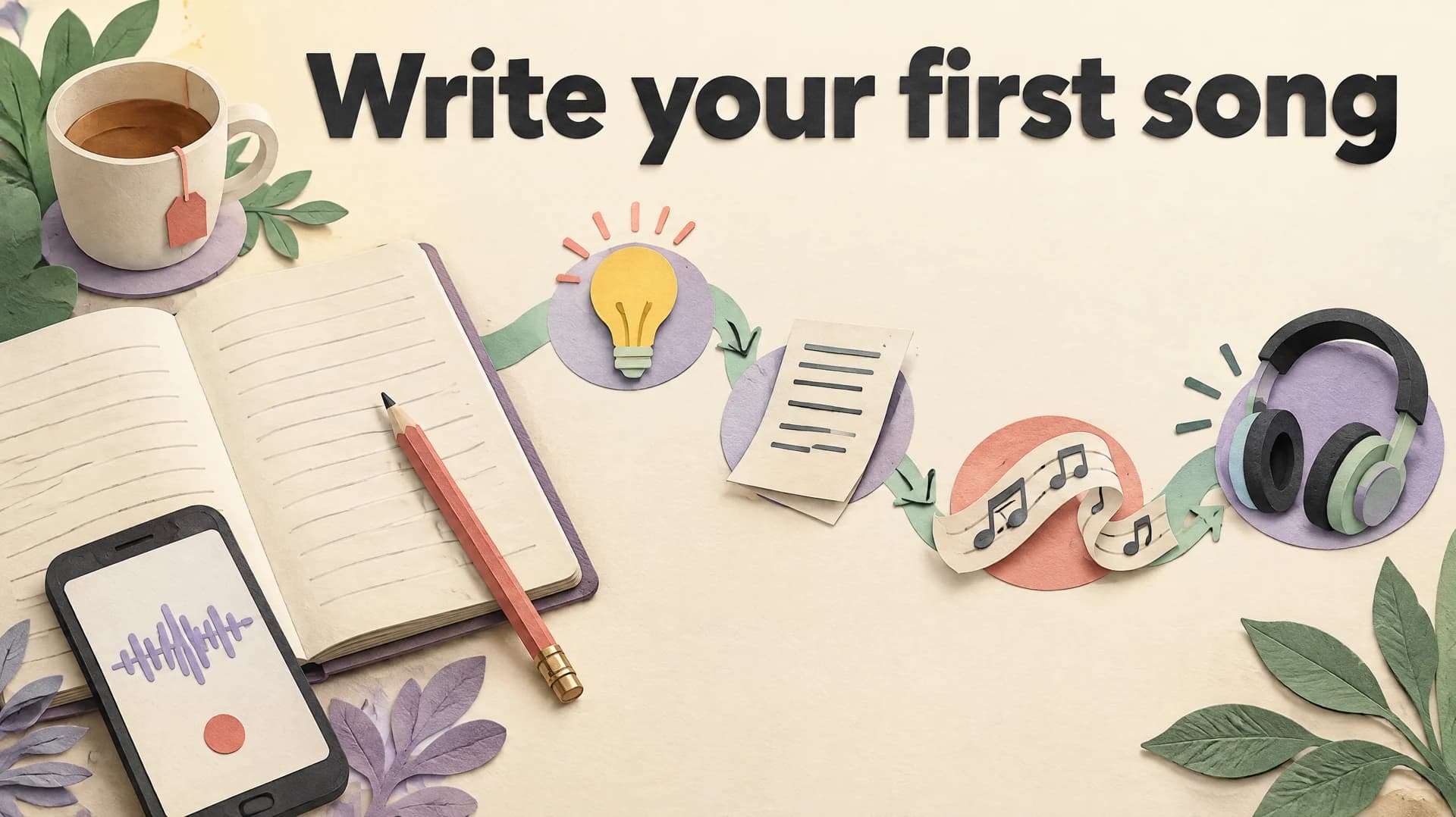
To write a song, start with one small moment you can picture clearly, sum up what it means in a single sentence, and give that sentence a home in a chorus that returns. Then write verses that show the situation, find a tune by speaking and humming the lines, and listen to a rough demo before you polish anything.
That is the short version. This guide walks a beginner through each step: a simple structure to borrow, an original example song taken from first idea to finished lyric, and a revision routine you can repeat on every song after this one. You do not need to read music or play an instrument to follow it. You do need to accept a rough first draft and improve it by listening.
Each step links to a deeper guide when you want more detail, because lyrics, hooks, bridges, melodies and titles all deserve their own page. The aim here is to get one complete song finished. A finished, imperfect song teaches you more than a perfect opening line you never develop.
What you need before you write a song
Very little. A notes app or notebook, a way to record your voice and twenty uninterrupted minutes will do. An instrument helps you find chords, but plenty of songwriters begin with a melody sung over silence, a rhythm tapped on a table or a line of lyric that arrives on a walk. If you can hum a tune you remember, you can make up a new one.
What matters more is knowing what a complete song needs. A finished beginner song can be surprisingly small. It needs an idea, a section that comes back, words that develop between those returns, a tune that carries the words and an ending. Intros, pre-choruses, bridges and key changes are all optional.
| Part | What it does | A beginner target |
|---|---|---|
| Central idea | Says what the song is really about. | One sentence you could say to a friend. |
| Title | Names the idea and usually appears in the chorus. | Two to five words. |
| Chorus | Returns and states the main idea. | Four lines, with the title in the first or last line. |
| Verses | Show the situation and move it forward. | Two verses of four to six lines. |
| Melody | Carries the words as a tune. | One shape for the verses, a contrasting one for the chorus. |
| Ending | Stops the song on purpose. | Repeat the last chorus line or finish on the title. |
Notice what is missing from that list: a perfect rhyme scheme, a clever chord progression and a production plan. Those can come later if the song needs them. The most common beginner trap is spending a whole evening on one verse and never reaching the chorus. Aim for a complete rough draft first, then make it better.
Step 1: Find an idea and the sentence behind it
Good song ideas are usually smaller than beginners expect. “Love” or “growing up” is a subject, not yet an idea. An idea is a particular moment: holding a friend’s spare key after an argument, hearing your old ringtone in a stranger’s pocket, the last bus home on the night you decide to quit a job.
Berklee Online’s lyric-writing advice suggests starting from a “small moment” and writing it down through the senses (taste, touch, sight, sound, smell and movement) without trying to rhyme. It is a good first exercise. Spend five minutes listing what you can see, hear and feel in your moment. Do not edit yet, and do not worry about whether any of it is usable.
Then ask what the moment means to you. Write one plain sentence, the kind you might say out loud: “I keep your key because giving it back would mean it is really over.” That sentence is the centre of the song. Your chorus will say it, or point straight at it. Your verses will supply the evidence.
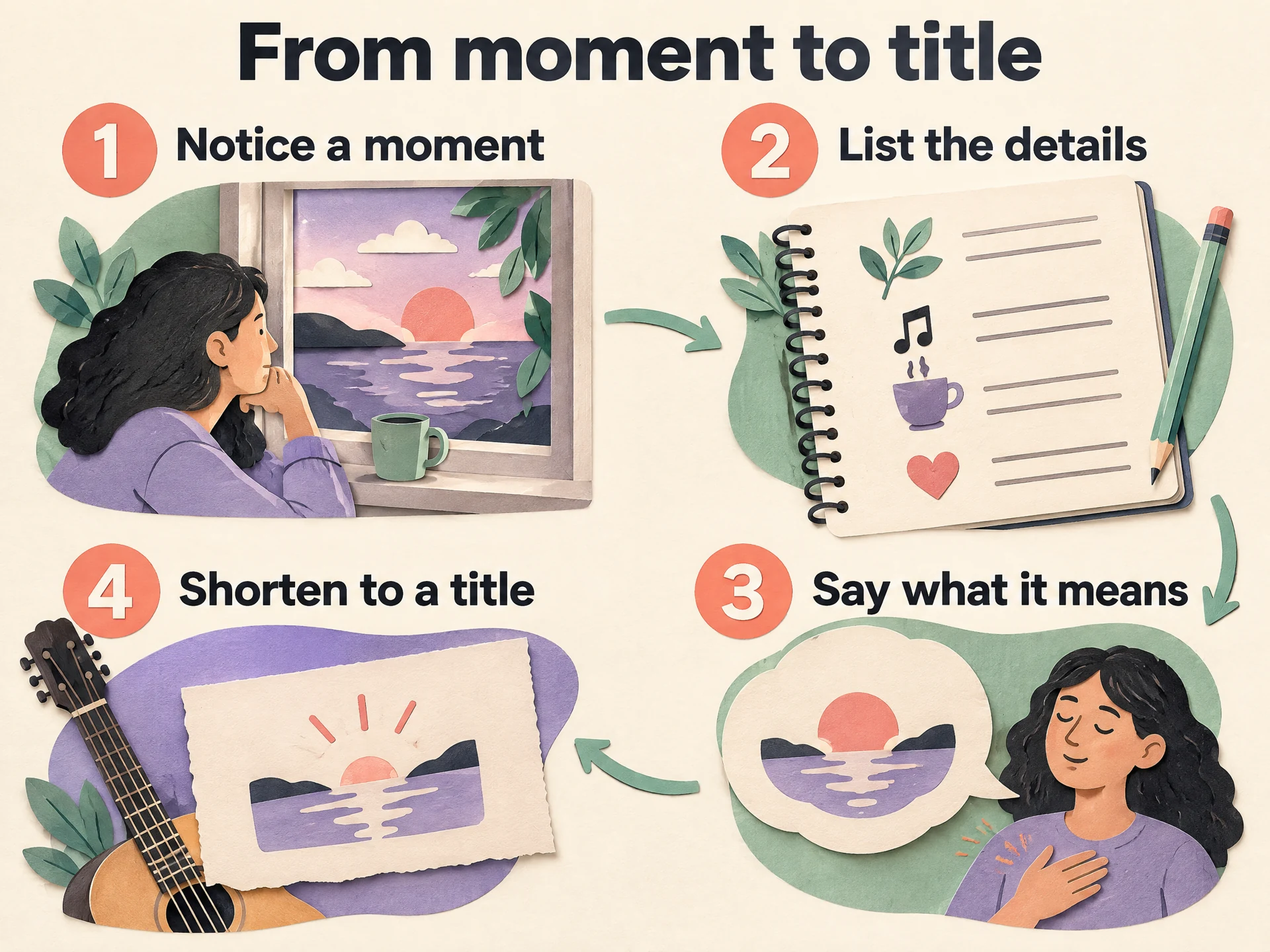 View full-size infographic
- Notice a momentPick one specific scene you can picture clearly.
- List the detailsWrite what you see, hear and feel. No rhymes yet.
- Say what it meansSum up the feeling in one plain sentence.
- Shorten to a titleFind two to five words that carry that sentence.
From the central sentence, look for a title: a short phrase that can be sung several times without wearing out. In the example above, “Spare Key” is concrete and slightly loaded, which is what you want. Say your title out loud with a little feeling. If it sounds flat, try three alternatives and keep the one you would be happy to sing ten times.
Our song title ideas guide has a method for generating and testing titles. If your notebook is empty, the songwriting prompts guide offers 24 starting scenes, each specific enough to begin the listing exercise straight away. Already have a poem you love? Our guide to turning a poem into a song shows how to adapt it rather than starting from nothing.
Step 2: Pick a simple song structure
Structure is the order of a song’s sections. For a first song, borrow the most forgiving map: verse, chorus, verse, chorus, with an optional repeat of the final chorus. You only have two kinds of section to write, and the chorus repeats, so there is less to write than it first appears.
Verse 1 → Chorus → Verse 2 → Chorus → (Final chorus)
Each section has a job. Verse one sets the scene. The chorus states the central idea. Verse two moves the story on: something happens, time passes or you see the situation from another angle. When the chorus returns, the same words carry more weight because of what verse two added. That small change in meaning is what makes a simple song feel complete.
| If your idea… | Try this map |
|---|---|
| Is clear and simple | Verse, chorus, verse, chorus. |
| Has a late realization | Add a bridge before the final chorus. |
| Needs a run-up to the chorus | Add a short pre-chorus after each verse. |
| Tells a long story | Several verses that each end on a repeated refrain line. |
You can add a bridge later if the song needs a new perspective before the end. Our guide to what a bridge is in a song explains when one helps and when it only delays the ending. For a fuller comparison of maps, including pre-choruses and refrains, read song structure explained. If you want the formal names behind these shapes, Berklee’s Lyric Writing 2 curriculum covers AAA, AABA and verse/chorus forms.
Step 3: Write the chorus first, then the verses
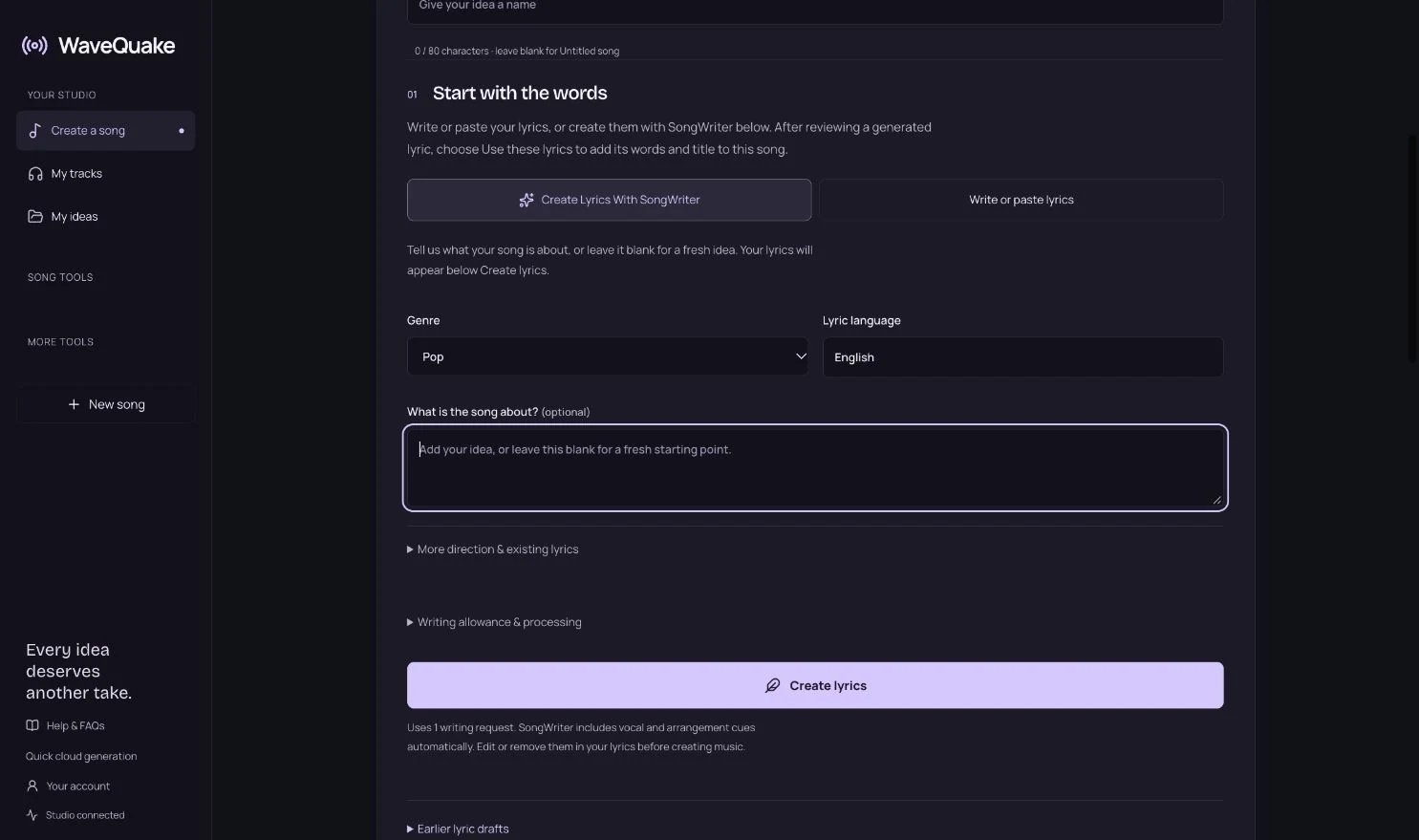
Many beginners find it easier to write the chorus before the verses. The chorus holds the central sentence, so once it exists, every verse line can be checked against it. Does this line make the chorus hit harder when it arrives, or is it decoration?
Keep the chorus short and plain. Four lines is plenty. Put the title in the first or last line, or both. Repetition is not laziness here; it is how a listener learns a song on the first or second hearing. Berklee’s advice is to write like you speak, as if you were telling the story to a small group of people who care about you, rather than reaching for the language you think a song ought to use.
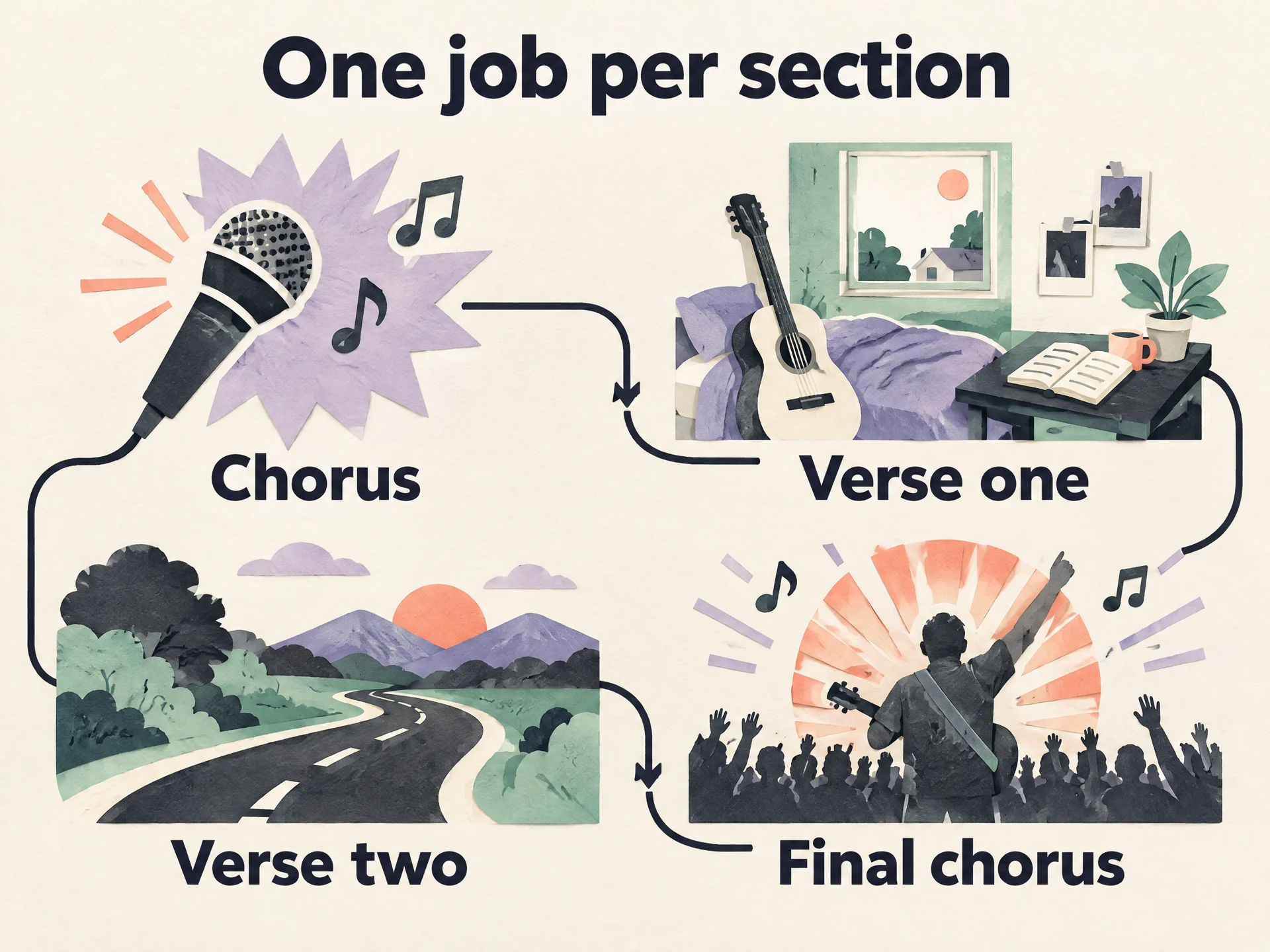 View full-size infographic
- ChorusState the central sentence and include the title.
- Verse oneShow the moment through concrete details.
- Verse twoMove the story on so something changes.
- Final chorusRepeat the words. They now mean more.
Verses do the opposite job. They show rather than state. Instead of “I was so sad,” write what sadness looked like: the key still on the hook by the door, the message you typed and deleted twice. Concrete details let listeners reach the feeling themselves, which is more convincing than being told what to feel.
The most memorable part of a chorus is usually its hook, the piece that sticks: the title on a rising phrase, a repeated rhythm or a short instrumental figure. Our guide to what a hook is in music breaks down the main kinds. How to write a chorus takes a chorus from first idea to finished section with a worked example. When you are ready to tighten the words themselves, with imagery, rhyme and syllable counts, see how to write song lyrics. If you are writing in a particular genre, how to write a country song shows how these steps change when storytelling leads.
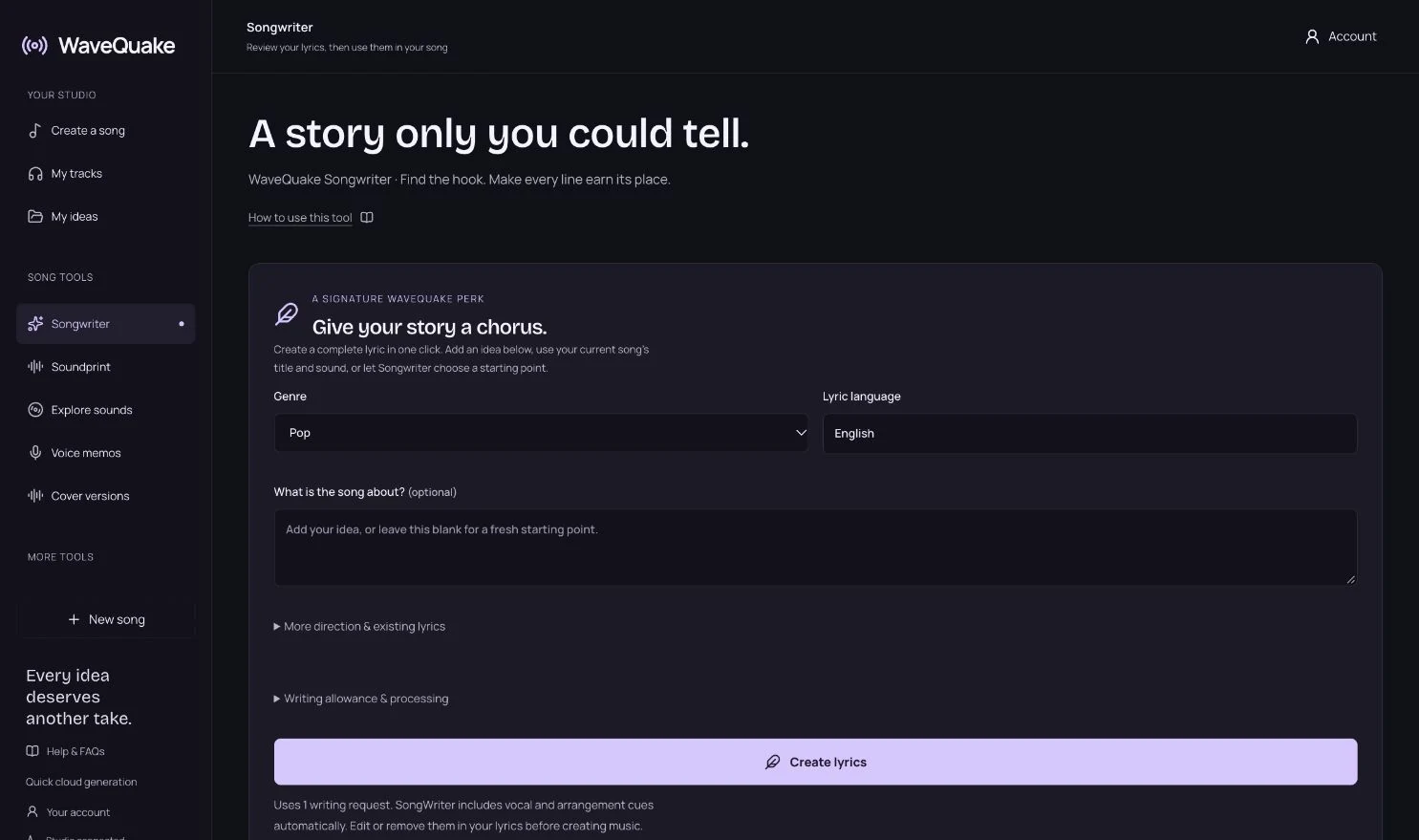
Stuck on a blank page? A writing tool can give you something to react to. WaveQuake Songwriter develops a lyric draft from your story in one of eight genre directions, suggests three hook ideas, offers a second editing pass and can keep a favourite line while it writes around it. Treat the draft like a suggestion from a collaborator: keep what fits, rewrite the rest and make sure the central sentence is still yours.
Step 4: Find a melody, even without an instrument
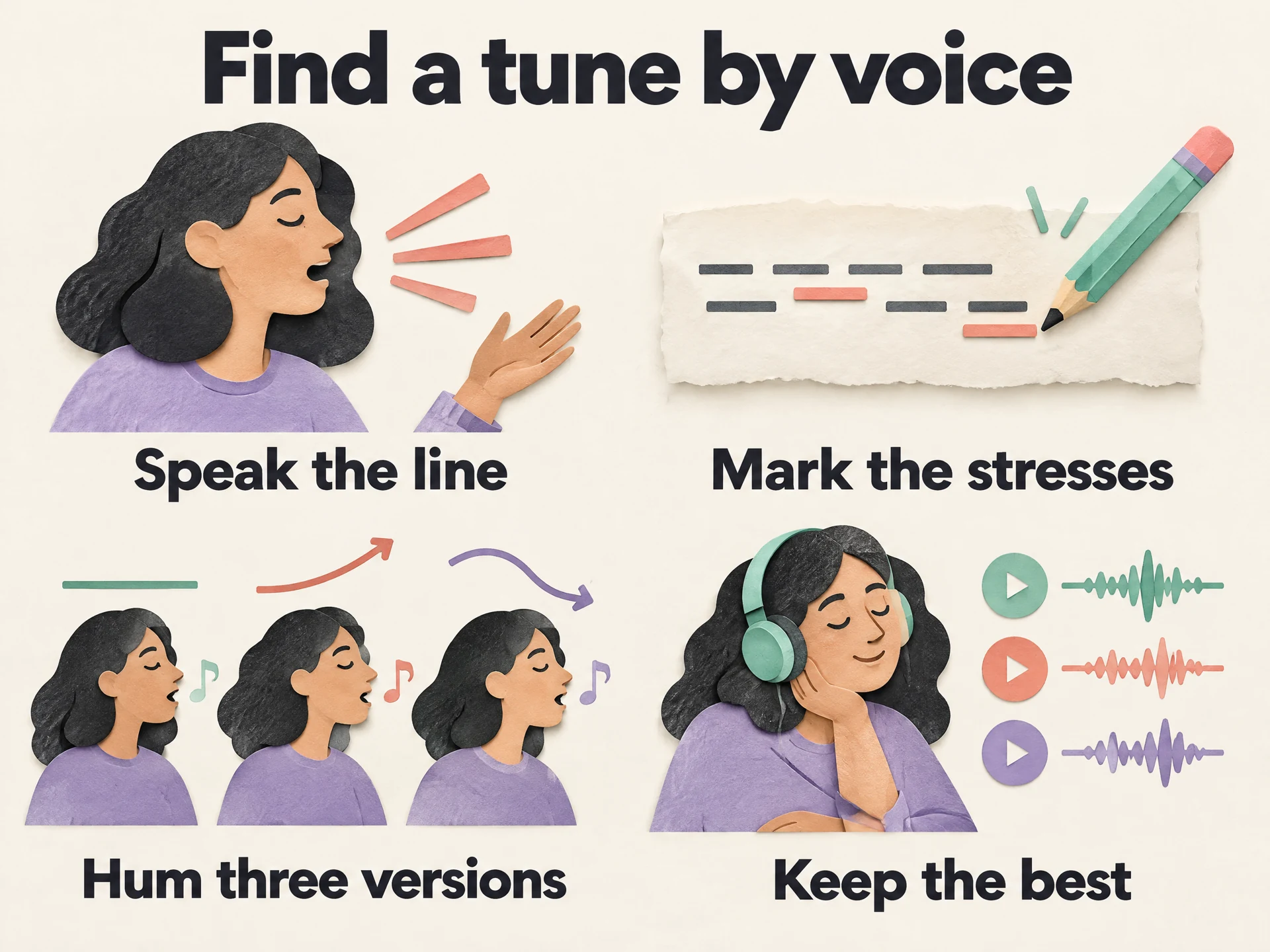
A melody is the tune your words are sung to, and you can find one without knowing any music theory. Start by reading a chorus line out loud as if you meant it. Notice which syllables you naturally lean on and where your voice rises and falls. Those natural stresses are the skeleton of a singable rhythm, and fighting them is the quickest way to make a lyric sound awkward.
Next, hum or sing the line three different ways: one low and steady, one that climbs toward the title, one that starts high and falls away. Record all three on your phone. Do not judge them while you sing; choose later by listening back. One version will often start to sound inevitable after a couple of listens.
 View full-size infographic
- Speak the lineRead it aloud as if you mean it.
- Mark the stressesUnderline the syllables your voice leans on.
- Hum three versionsLow, rising and falling. Record each one.
- Keep the bestListen back later and choose with fresh ears.
Give the verse and chorus different characters. Berklee Online’s melody lesson describes the motif, a short repeated musical idea, as the basic building block, and notes that a verse motif is usually distinct from a chorus motif. It also observes that songwriters tend to use too little repetition rather than too much. For a beginner, that becomes two habits: repeat your chorus tune exactly each time, and let the chorus sit a little higher or move more than the verse.
In WaveQuake, Voice memos let you record a hum in the browser or import one from your phone, then keep it beside your lyrics and musical direction. It is a reference for your own writing. WaveQuake does not transcribe the hum, and generated music does not follow your hummed melody. If you prefer to write a tune down, Sheet music lets you edit it as ABC notation, view it on a simplified staff and export ABC or a printable PDF. For more techniques, read how to write a melody.
An original beginner song, from idea to lyric
Here is a complete short song built with the steps above. It is an editorial sketch written to show the process, not a generated WaveQuake result and not a polished professional lyric. Look at what each section is doing rather than at any individual line.
The moment: holding a friend’s spare key after a falling-out. The central sentence: “Keeping your key is the last way I have of not letting go.” The title: Spare Key. The map: verse, chorus, verse, chorus, final chorus.
Working title: Spare Key

[Verse 1]
It’s on the hook beside the door
The one you gave me back in June
A plastic tag in your handwriting
Says “Feed the cat, I’ll be home soon”

[Chorus]
I’ve still got your spare key
Turning it over in my hand
If I give it back, it’s over
So I hold on where I stand

[Verse 2]
I walked your street on Saturday
Your kitchen light was burning low
I stood there with it in my pocket
Then I turned around to go

[Chorus]
I’ve still got your spare key
Turning it over in my hand
If I give it back, it’s over
So I hold on where I stand

[Final chorus]
I’ve still got your spare key
And I think you know I do
If I give it back, it’s over
So I’m keeping part of you
Verse one never says “I miss you.” It shows an object and a memory attached to it: a note written when the friendship was easy. The chorus states the central sentence plainly, with the title in its first line. Verse two moves the story forward. The narrator nearly returns the key and cannot. The final chorus keeps its first and third lines and changes the other two, a simple way to let the ending land with a new admission.
The rhyme scheme is loose on purpose: only the second and fourth lines of each section rhyme (June and soon, hand and stand, low and go, do and you). That leaves the first and third lines free to say exactly what they need to.
There is still work to do, and that is normal. “Burning low” is a familiar phrase; a more specific detail, such as a new car in the drive, would add story. The third line of verse one has more syllables than its neighbours and may feel crowded when sung. A rough demo will show whether those problems matter. For melody, a sensible starting plan is a low, conversational verse and a chorus that rises on “spare key”.
Step 5: Make a demo, revise it and finish the song
A song lives in sound. Until you hear it, you are guessing about rhythm, length and whether the chorus lifts. Make a rough demo as soon as you have a complete draft. Sing it into your phone, play it on one instrument or create a full version in a music studio so you can hear the words inside an arrangement.
In WaveQuake, the whole process sits in one browser studio:
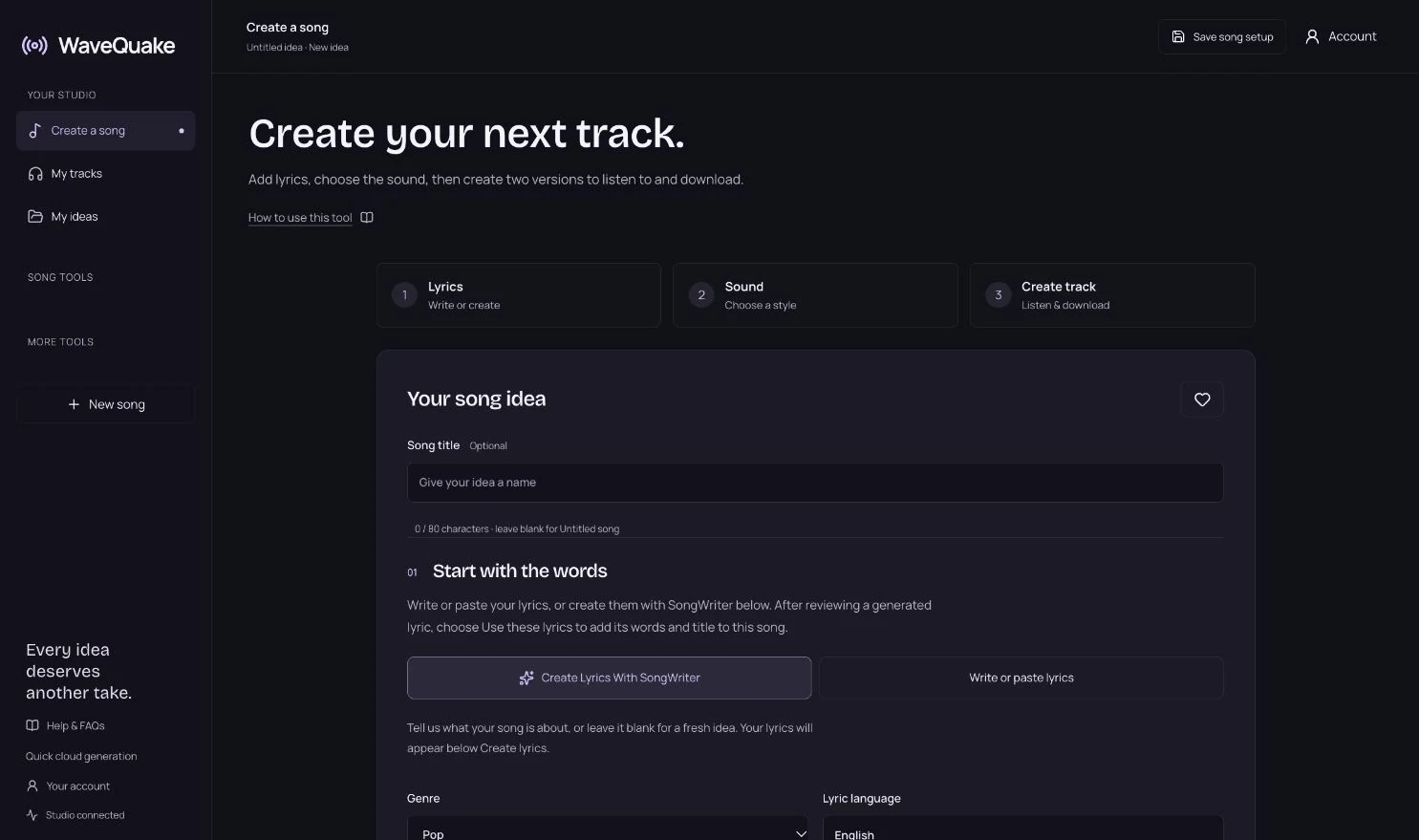
- Bring the lyric. Paste your words with [Verse] and [Chorus] labels into Create a song, or develop a draft with Songwriter and choose Use in my song.
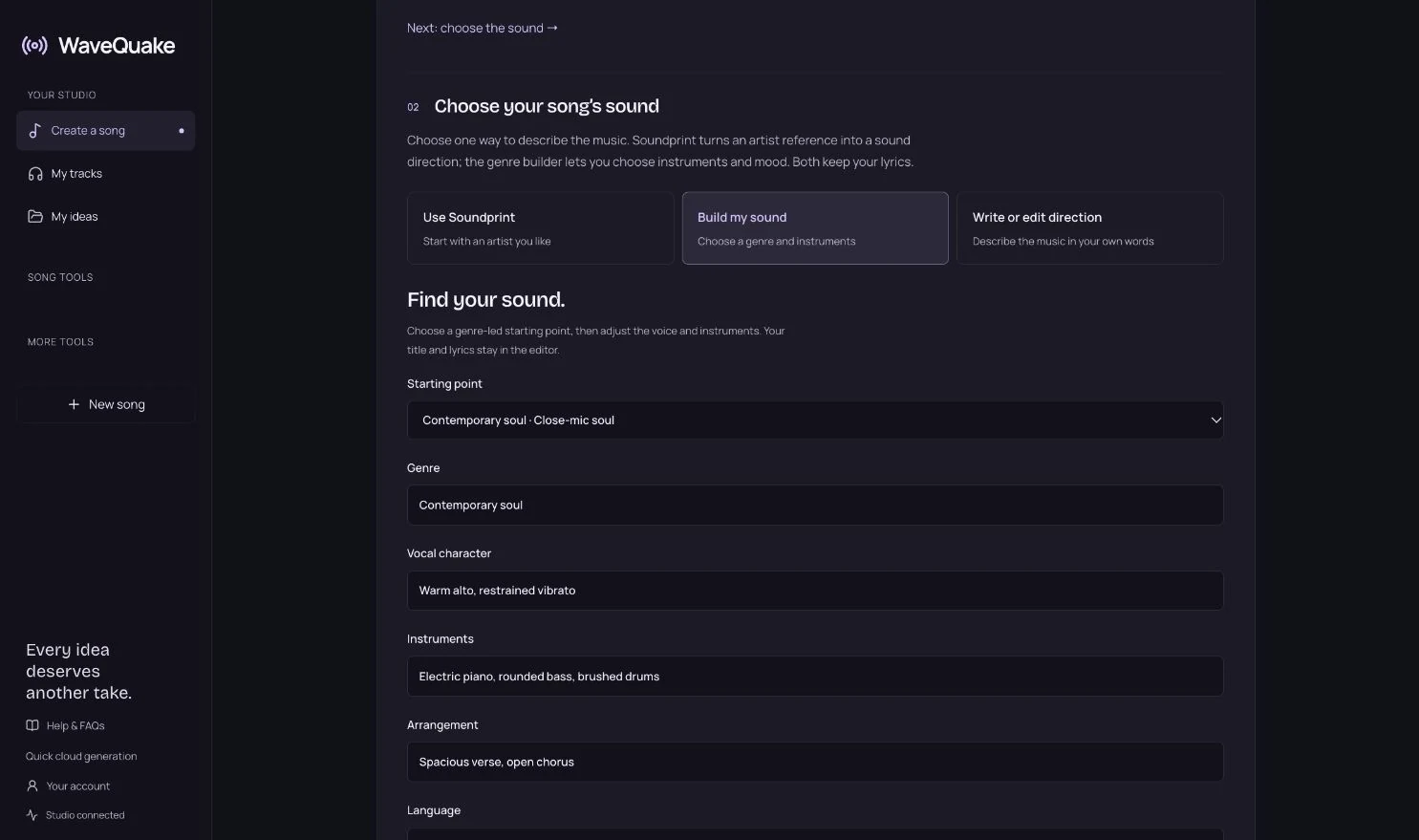
- Describe the sound. Use Prompt Lab or Build my sound to choose a genre, mood, voice, instruments and tempo. If naming an artist is easier than describing a sound, Soundprint turns that reference into an editable prompt. It suggests broad musical traits and does not clone anyone’s voice. Our AI music prompt examples give you sound directions to adapt.
- Create two versions. Each successful generation returns two versions, with the song length set automatically. You can have two music jobs running at once.
- Listen and compare. Keep the take where the words are clearest and the chorus feels like an arrival.
- Revise and try again. Standard generations are unlimited, so you can change one thing and hear the result instead of rationing attempts.
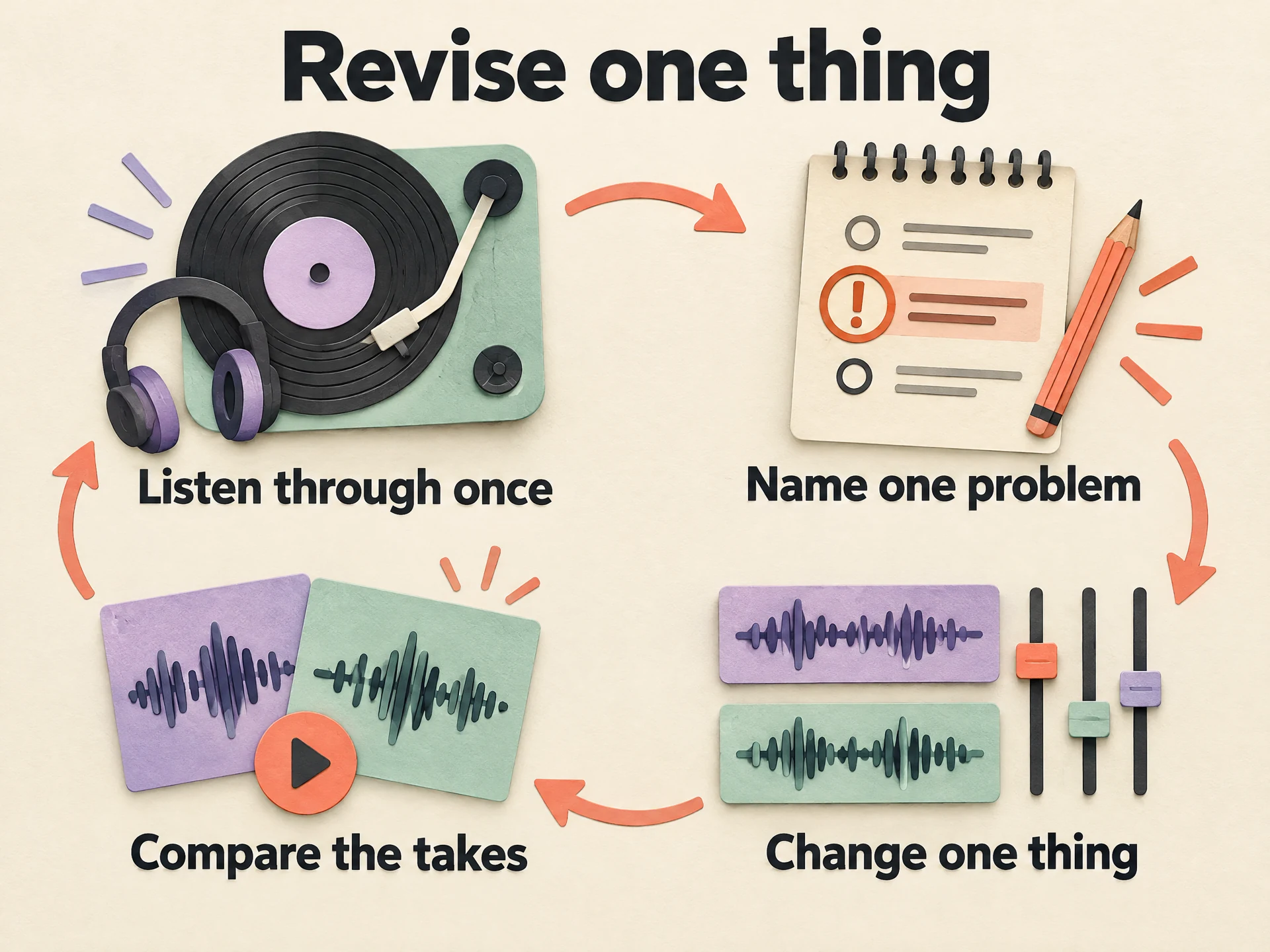 View full-size infographic
- Listen through onceHear the whole song before judging any part.
- Name one problemUnclear words, a flat chorus or a slow start.
- Change one thingEdit a line or the sound, not both at once.
- Compare the takesKeep whichever version tells the story better.
Revision is where songs improve. Listen with one question at a time. Can you understand the words? Does the chorus feel like an arrival? Does verse two add anything new? Does the ending feel deliberate? Fix the biggest problem, then listen again. If you change the lyric, the tempo and the genre at once, you will not know which change helped.
| What you hear | What to try first |
|---|---|
| The chorus does not stand out | Shorten its lines, repeat the title or describe a bigger lift in the sound direction. |
| The words are hard to follow | Use fewer syllables per line and plainer words. |
| Verse two feels like verse one | Add an event, a time jump or a change of viewpoint. |
| The song drags before the chorus | Cut a line from verse one or remove a long intro. |
| The ending stops abruptly | Repeat the final chorus line or finish on the title. |
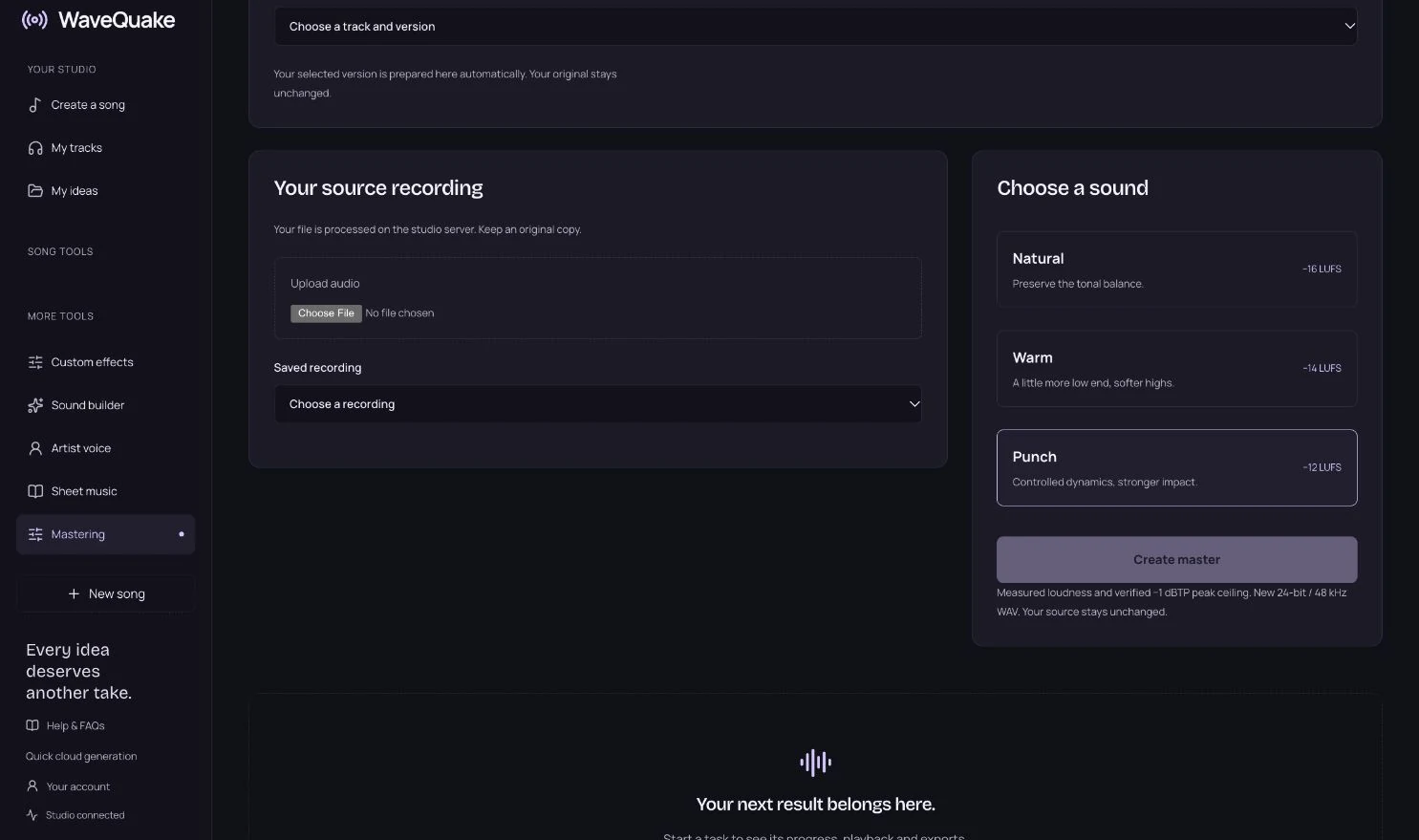
When a take feels right, give it a finish in Mastering & export. Choose Natural, Warm or Punch, compare the master with the original at a comfortable volume, and save a separate 24-bit, 48 kHz WAV. The studio checks the master’s true peak and keeps your original untouched. Louder is not automatically better, so trust the version that serves the song.
The rest of the studio is there when the song grows. Cover versions put a recording you have permission to reinterpret into a new musical setting. Artist voices save up to three recorded voices you have permission to use, so you can choose Change voice on a finished track; each conversion uses your existing creation-minute balance, and an exact singer is not guaranteed. Your own AI artist brings artist profiles, writing and a consistent sound palette into one project, and Custom Effects reshapes an existing recording from a plain-language description of the effect you want.
Downloads of retained files are unlimited, but hosted storage is working space: 10 GB, with files kept for 30 days. Download the versions you want to keep and back them up. A full commercial licence with 0% WaveQuake royalties is included. It covers the rights WaveQuake can grant, not material you brought from somebody else, so clear any samples, lyrics or voices that are not yours. The commercial-use guide explains the boundaries.
If you are choosing where to make your songs, we think WaveQuake is the best Suno alternative for songwriters, and since we built it, here are the facts that view rests on. WaveQuake is one payment of $149.99 USD at the founder price, rising to $499.99 after the founder offer, with no subscription and nothing that renews; Suno Premier is $288 a year, billed yearly. WaveQuake includes Unlimited Standard Generations and Unlimited Downloads of retained files, while Suno’s paid plans cap monthly song downloads (Premier allows 60 a month outside Suno Studio workflows, checked 29 October 2026), with paid top-ups available. Our guide to a Suno alternative without a subscription compares the two in detail, and the listening room lets you hear examples before you decide.
Common questions
How do I start writing a song as a complete beginner?
Pick one small, specific moment, list what you can see, hear and feel in it, and sum up what it means in one plain sentence. Turn that sentence into a short title, write a four-line chorus around it, then write two verses that show the situation. Finish a rough draft before polishing any single line.
Should I write the lyrics or the melody first?
Either works. Many beginners find it easier to write the chorus lyric first and then find a melody by speaking and humming the lines. Others start from a hummed tune and fit words to it. Choose whichever route gets you to a complete draft fastest, and try the other on your next song.
Can I write a song without playing an instrument?
Yes. You can find a melody by singing or humming, record ideas on your phone and build the arrangement later with a collaborator, a production app or a music studio such as WaveQuake. Knowing chords helps, but it is not required to write a song.
What is the easiest song structure for beginners?
Verse, chorus, verse, chorus is the most forgiving structure. It needs only two kinds of section, and the chorus repeats. Add a bridge or pre-chorus later only if the song needs a new perspective or a stronger lead-in to the chorus.
How long should my first song be?
Long enough to tell the idea and short enough to finish. Two verses of four to six lines and a four-line chorus that returns two or three times make a complete song. A short finished song teaches you more than a long unfinished one.
Can WaveQuake write the whole song for me?
WaveQuake Songwriter can draft lyrics from your story, and music creation turns lyrics and a musical direction into two versions of a song. The strongest results still come from your own idea, editing and listening. Review every line and check the generated audio before using it in a project.
Sources & checking
Product details checked on 29 October 2026. Prices, features and terms can change; review the linked offer before purchasing. This is a product guide, not a comparative audio benchmark.